Mac 截图快捷键
1 | Shift + Command + 3 截取所有屏幕; |
1 | Shift + Command + 3 截取所有屏幕; |
1 | /usr/libexec/java_home -V |
ctl的创建如下:
1 | private final AtomicInteger ctl = new AtomicInteger(ctlOf(RUNNING, 0)); |
上面中的RUNNING为:
1 | private static final int RUNNING = -1 << COUNT_BITS; |
-1做左移COUNT_BITS运算
COUNT_BITS如下:
1 | private static final int COUNT_BITS = Integer.SIZE - 3; |
其中Integer.SIZE=32,得知COUNT_BITS为29,那么RUNNING为左移-1左移29位,-1的二进制表示为11111111111111111111111111111111,左移29位11100000000000000000000000000000。
ctlOf的计算方式如下:
1 | private static int ctlOf(int rs, int wc) { return rs | wc; } |
线程的运行状态与线程数量做或运算,所以运行状态左移29位后,将高3位表示运行状态,低29位表示线程数量。
由于线程池的运行状态只有如下几种:
1 | // runState is stored in the high-order bits |
所以高3位足以表示所有的运行状态。
线程池提供了运行状态和线程数量的计算方法:
1 | // Packing and unpacking ctl |
运算常量
1 | private static final int CAPACITY = (1 << COUNT_BITS) - 1; |
所以runStateOf 为舍弃掉低29位后的值,workerCountOf 为舍弃掉高3位后的值。
https://pulsar.apache.org/download/
下载完成后解压
1 | bin/pulsar standalone |
1 | bin/pulsar-client consume my-topic -s "first-subscription" |
1 | bin/pulsar-client produce my-topic --messages "hello-pulsar" |
使用ctrl+c结束进程
1 | package com; |
1 | <bean id="sqlSessionFactory" class="org.mybatis.spring.SqlSessionFactoryBean"> |
前提情况下 是有代理
端口号是代理服务器本地端口
1 | git config --global http.proxy http://127.0.0.1:1080 |
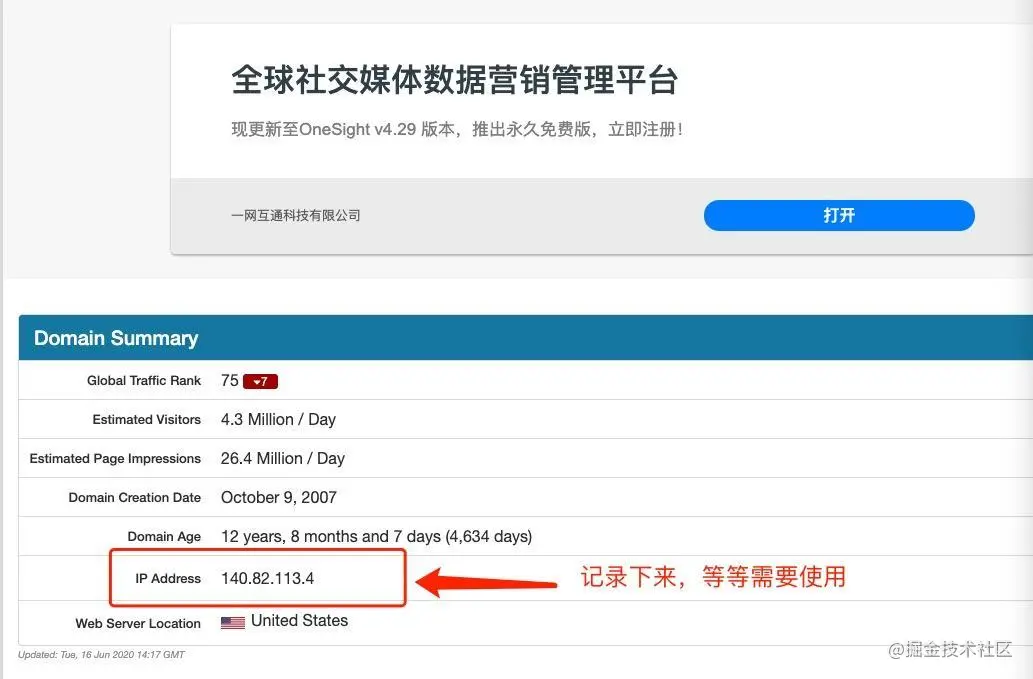
把IP Address 记录下来! 把IP Address 记录下来! 把IP Address 记录下来!
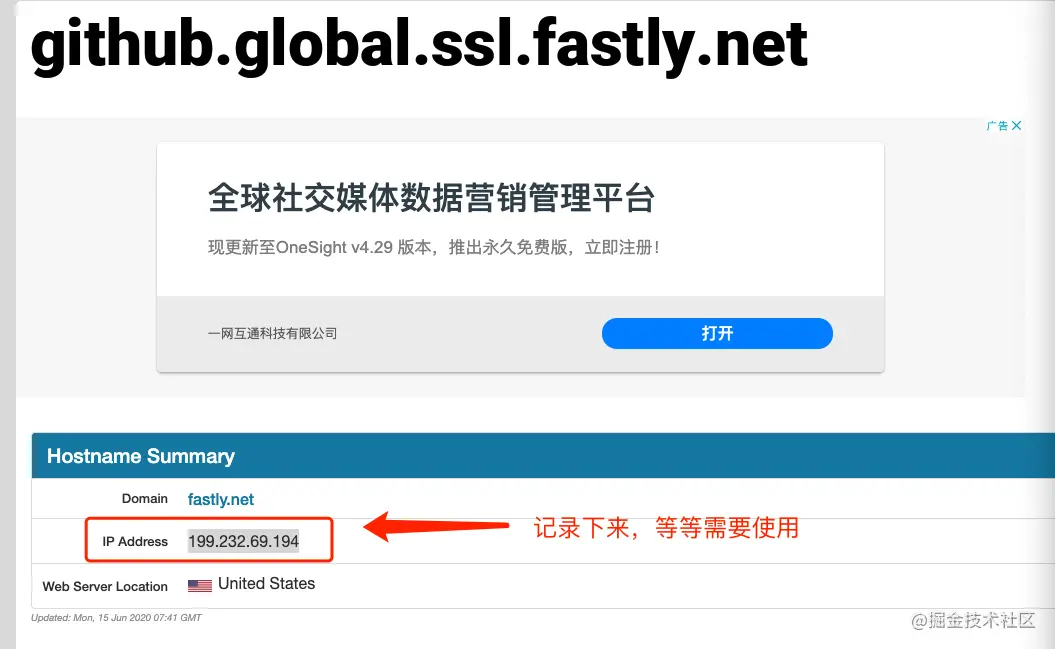
把IP Address 记录下来! 把IP Address 记录下来! 把IP Address 记录下来!
3. 打开https://github.com.ipaddress.com/assets-cdn.github.com 如下图:

把IP Address 记录下来! 把IP Address 记录下来! 把IP Address 记录下来!
4. 打开电脑的hosts文件,把下列的东东写在最后,然后保存即可
1 | 140.82.113.4(图1的IP Address) github.com |
1 | sudo killall -HUP mDNSResponder;say DNS cache has been flushed |
1 | package com; |
Licensed to: ASIO Allsoftinone
Quantity: 1 user
Serial number: 1822-9597
License type: Pro Edition for Linux
First delete away trial mode:
1 | sudo rm -rf ~/.config/bcompare #thinks bensonkb |
1 | sudo sed -i "s/keexjEP3t4Mue23hrnuPtY4TdcsqNiJL-5174TsUdLmJSIXKfG2NGPwBL6vnRPddT7tH29qpkneX63DO9ECSPE9rzY1zhThHERg8lHM9IBFT+rVuiY823aQJuqzxCKIE1bcDqM4wgW01FH6oCBP1G4ub01xmb4BGSUG6ZrjxWHJyNLyIlGvOhoY2HAYzEtzYGwxFZn2JZ66o4RONkXjX0DF9EzsdUef3UAS+JQ+fCYReLawdjEe6tXCv88GKaaPKWxCeaUL9PejICQgRQOLGOZtZQkLgAelrOtehxz5ANOOqCaJgy2mJLQVLM5SJ9Dli909c5ybvEhVmIC0dc9dWH+/N9KmiLVlKMU7RJqnE+WXEEPI1SgglmfmLc1yVH7dqBb9ehOoKG9UE+HAE1YvH1XX2XVGeEqYUY-Tsk7YBTz0WpSpoYyPgx6Iki5KLtQ5G-aKP9eysnkuOAkrvHU8bLbGtZteGwJarev03PhfCioJL4OSqsmQGEvDbHFEbNl1qJtdwEriR+VNZts9vNNLk7UGfeNwIiqpxjk4Mn09nmSd8FhM4ifvcaIbNCRoMPGl6KU12iseSe+w+1kFsLhX+OhQM8WXcWV10cGqBzQE9OqOLUcg9n0krrR3KrohstS9smTwEx9olyLYppvC0p5i7dAx2deWvM1ZxKNs0BvcXGukR+/g" /usr/lib/beyondcompare/BCompare |
Then restart BC, click “Enter License”:
1 | --- BEGIN LICENSE KEY --- |
or
1 | --- BEGIN LICENSE KEY --- |
For windows:
1 | --- BEGIN LICENSE KEY --- |
For Mac:
1 | --- BEGIN LICENSE KEY --- |
for 4.2.4 or higher,4.2.5,4.2.6,4.3.7,it’s works , this is the way which makes Always in evaluation mode 。
open Terminal, go to the dir : cd /Applications/Beyond Compare.app/Contents/MacOS
change the name BCompare to BCompare.bak: mv BCompare BCompare.bak
touch a file name BCompare , and chmod a+u BCompare : touch BCompare && chmod a+u BCompare
open BCompare with text editor, insert the script :
1 | #!/bin/bash |
restart bc .
1 | ----- BEGIN LICENSE ----- |
jar包冲突,导致
项目中已添加
1 | //分页插件 |
出现问题:net.sf.jsqlparser.statement.select.PlainSelect.getGroupByColumnReferences()Ljava/util/List;
去掉或者添加
1 | compile group: 'com.github.jsqlparser', name: 'jsqlparser', version: '3.1' |